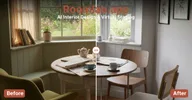
MCP-сервер RoomLab.app
Какие MCP-серверы принадлежат RoomLab.app, из официального реестра и найденные запросом к его домену, отвечают ли они и что умеют. Всё это проверила программа, а не переписал человек со страницы продукта.
прочитано 2026-10-10
- Адресhttps://mcp.roomlab.app/mcpнет в официальном реестре: ответил на запрос
Ни одна запись официального реестра MCP не называет этот сервер. Он ответил, когда Атлас запросил roomlab.app по одному из обычных для MCP-серверов адресов, значит, сервер принадлежит самому вендору. Клиенты и каталоги, которые берут серверы из реестра, его не показывают.
- Состояниеотвечаетпроверено 2026-10-27
- Инструменты19
- Сервер называет себяroomlab
- Версия сервера0.4.7
- Версия протокола2025-06-18
2026-10-27 сервер ответил на initialize и tools/list без входа. Первый ответ за 188 мс.
- Делают ли инструменты работу продукта, ещё не проверено.
- Проверок пока 1 из 7, нужных, чтобы судить о надёжности.
После подключения
- set_sky_blue, create_video_walkthrough, create_video_transition, create_house_tour меняют данные без входа: вызвать их может любой, у кого есть адрес.
- Описания занимают около 18615 токенов контекста: включайте только нужные задаче инструменты.
- У 7 из 19 инструментов параметры без типа или описания: проверяйте аргументы перед вызовом.
Вывод сделан правилами по замерам выше. Вероятный первый вызов выбрала модель по списку инструментов: прочитайте описание, прежде чем на него полагаться.
- Оценка INITE MCPчерез неделюдля оценки нужно 7 ежедневных проверок, пока 1
- Отвечалидёт замерпроверок пока 1, долю покажем после 7
- Медиана первого ответа587 мс
- Место в контексте агента≈ 18 615 токеновописания всех инструментов (19), они занимают контекст агента на каждом ходу
- Описания инструментовA · 94 из 100
- Типизированные ответы19 из 19 инструментовобъявлен outputSchema: ответ приходит с типами и читается сразу
- Параметры без описания: в 7 из 19
На что посмотреть
- Инструменты, которые меняют данные, на сервере, который отвечает без входа: set_sky_blue, create_video_walkthrough, create_video_transition, create_house_tour
Программа проверяет сервер раз в день: initialize и tools/list, без модели. Токены - это длина описаний из расчёта примерно четыре символа на токен. Оценка - среднее шести проверок имени, описания, схемы и аннотаций каждого инструмента. Она говорит, насколько понятно описаны инструменты, а не о том, работают ли они. Оценка складывается только из замеренного: отвечает ли сервер (25%), делает ли работу продукта (25%), описания (20%), контекст (10%), использование (10%) и насколько просто подключиться (10%). Незамеренная часть не учитывается, а скрытая инструкция ограничивает оценку 40 баллами. Состояние MCP-серверов вендоров: методика и цифры →
virtual_stage_roomUse only when the user wants furniture and decor added to an empty room. Ask only for the room image, room type, and design style when missing. Do not use this to restyle a furnished room.
change_room_styleUse only when the user wants a furnished room restyled while keeping its furniture arrangement. Ask only for the room image, room type, and design style when missing. Do not use this to furnish an empty room.
declutter_roomUse when the user wants clutter and visual mess removed while keeping the major furniture and architecture. This matches the Declutter Room workspace card.
empty_roomUse when the user wants all furniture, appliances, and decor removed so the room appears vacant. This matches the Empty Room workspace card.
replace_furnitureUse when the user wants one furniture item replaced with the item shown in a reference image. Ask for the room type and furniture item only when missing.
replace_materialUse when the user wants the material on a wall, floor, rug, curtain, countertop, backsplash, or another surface changed to match a reference image.
render_interiorUse when the user wants an interior sketch, model view, or design image turned into a photorealistic architectural render. Time of day and extra instructions are the only optional workspace controls.
render_exteriorUse when the user wants an exterior sketch, model view, or design image turned into a photorealistic architectural render. Time of day, season, landscape, and extra instructions match the workspace controls.
custom_promptUse for the workspace Custom Prompt mode when another named RoomLab mode does not match. The user may supply one main image, up to six reference images, and natural-language instructions.
set_sky_blueUse when the user wants a dull or cloudy sky changed to a clear bright blue sky while preserving the property and landscaping.
fill_and_clean_poolUse when the user wants a pool filled with clean water and the surrounding pool area tidied.
clean_gardenUse when the user wants weeds and debris removed so a garden or outdoor area looks neat and maintained.
make_grass_greenerUse when the user wants dry or patchy grass refreshed so the lawn looks green and healthy.
visualize_wall_colorsUse this when the user wants to compare paint colors on the walls of the same room. It returns a nine-color comparison. Color preferences are optional; use RoomLab’s balanced default palette when the user did not specify colors.
create_video_walkthroughUse when the user wants one room photo animated with a camera move or other described effect. The effect and 5- or 10-second duration match the workspace controls.
create_video_transitionUse when the user wants an animated transformation from a start image to an end image. The transition style and 5- or 10-second duration match the workspace controls.
create_house_tourUse when the user wants a cinematic tour made from three to six room images in order. The workspace offers an automatic or user-written script and 12-, 15-, or 30-second durations.
upscale_room_imageUse this when the user asks to make an existing RoomLab image 4K. The generation ID is enough; RoomLab retrieves the image and selects the correct upscale path internally.
get_generationCheck a RoomLab.app creation and return status or finished media as data, without opening another card. The existing creation card polls automatically. Use this tool when no card is available or the user asks to check a result; do not…
Как подключить
Добавьте сервер в конфиг MCP-клиента. Claude Desktop, Cursor и большинство других клиентов понимают такой вид:
{
  "mcpServers": {
    "roomlab": {
      "type": "http",
      "url": "https://mcp.roomlab.app/mcp"
    }
  }
}Подключить
Claude Code, в терминале
claude mcp add --transport http roomlab https://mcp.roomlab.app/mcpДобавить в CursorДобавить в VS Code
claude.ai, ChatGPT и другие клиенты: добавьте https://mcp.roomlab.app/mcp как свой коннектор в настройках.
Каждую строку нашла программа: запись в реестре, ответ самого сервера, разобранная спецификация. Если строки нет, мы этого не нашли; это не значит, что этого нет.
Cookie
Прежде чем засчитать визит
Аналитика и измерение рекламы показывают, какие страницы работают и какая наша реклама приносит результат: Google Analytics и Google Ads, пиксель Meta, Яндекс Метрика и один наш собственный идентификатор. До вашего ответа ничего не сохраняется, а после отказа сайт работает так же.